(This is a guest blog post, written by Carl Caldwell, CAD/CAM Manager at DMG MORI).
I’ve spent most of my career working with Siemens NX - as a power user, as someone who supported customers directly, and now at DMG MORI, where NX underpins much of what we do from an engineering and machine-tool perspective.
Because of that background, I’m often asked a familiar question when new automation tools appear in CAM:
“Isn’t this just feature-based machining?”
It’s a fair question. Feature-based machining (FBM) has been around for a long time, it’s powerful, and in the right environment it can deliver real productivity gains. But having now used CloudNC’s CAM Assist alongside FBM, I’m convinced they are fundamentally different tools - designed for very different realities in modern manufacturing.
Let me explain why.
Feature-Based Machining: Powerful, but purpose-built
Feature-based machining is a knowledge-based, rule-driven system. When it works well, it works very well.
I’ve seen FBM deliver outstanding results in environments where:
- Geometry is highly consistent
- Parts are largely prismatic
- The same features appear over and over again
- Processes are repeated at scale
A good example is mold bases. Mold bases are typically pockets, holes, and standard prismatic features. In one shop I worked with, a dedicated programmer used FBM almost exclusively for mold base creation, cutting programming time by around 60%. That’s a real win.
Similarly, in automotive applications where specific port geometries or drilling strategies are repeated across many parts, FBM can be worth the significant upfront effort required to author and maintain those rules.
And that’s the key phrase: upfront effort.
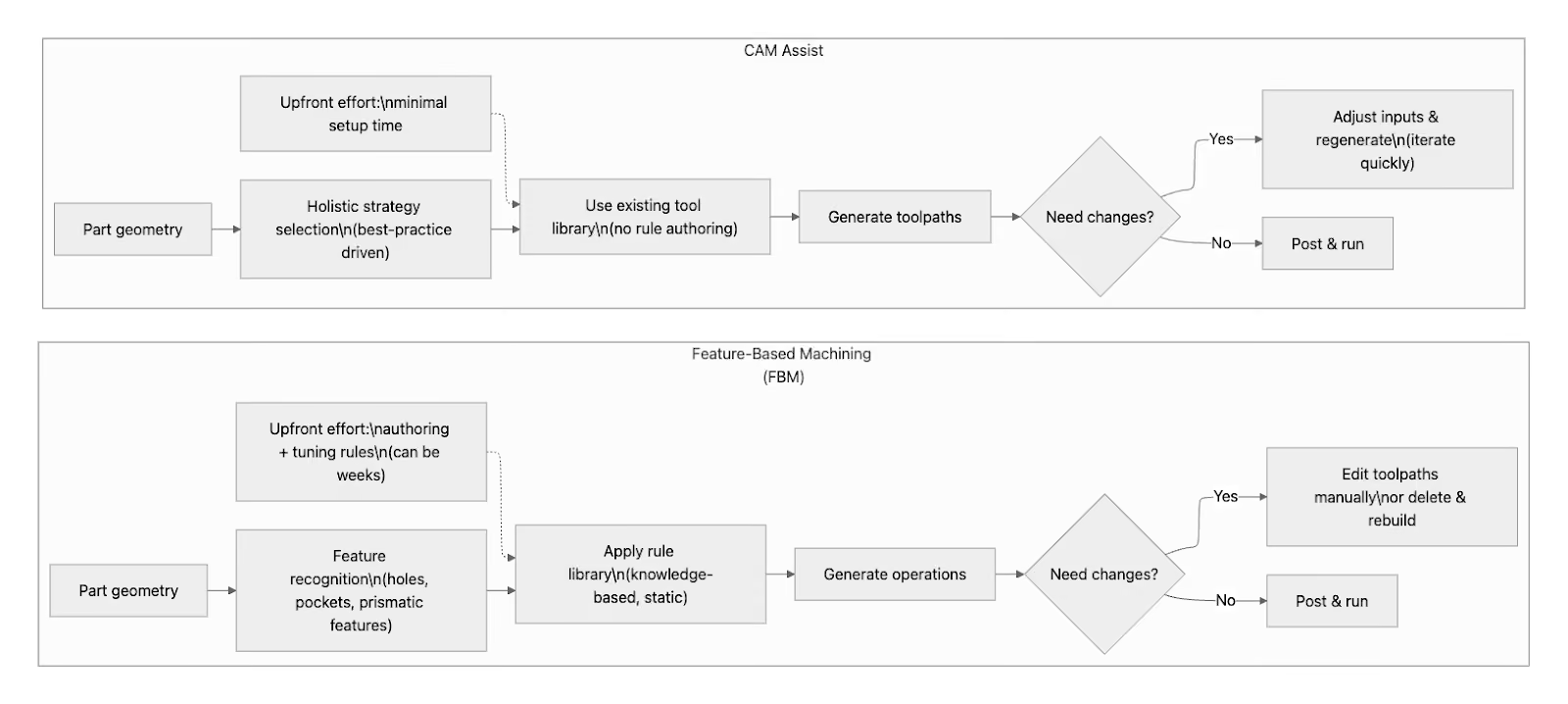
The cost of FBM is paid before you cut a chip
Feature-based machining doesn’t just “work out of the box” for most real-world parts.
To get real value from FBM, you typically need:
- Time to author and tune rule sets
- Deep system knowledge
- Feature-based authoring skills
- Ongoing maintenance as tooling and strategies evolve
In one project I worked on, setting up a robust FBM process took nearly a month of focused effort. That investment only made sense because the geometry never changed.
And FBM is static by nature. Unless you manually update it, it does not evolve with:
- New toolpath technologies
- New machining strategies
- Changes in best practice
We saw this clearly with adaptive milling in NX. It took multiple releases before FBM workflows even began to adopt it - and in many cases, they still don’t by default.
That’s not a criticism of FBM. It’s simply what happens when knowledge-based systems are tightly coupled to predefined rules.
Where FBM starts to break down
The moment you step outside highly repeatable, basic work, FBM becomes harder to justify.
In particular:
- Mixed 3+2 or contoured geometry
- Specialty features
- Aerospace-style material removal
- High-mix, low-volume job shop work
FBM will often recognize some features, but not all. You end up editing, deleting, or rebuilding toolpaths manually. And in NX, once you choose an operation type, you often can’t change it later - you have to start over.
At that point, you’re no longer saving time. You’re fighting the system.
CAM Assist: A different philosophy
CAM Assist approaches the problem from an entirely different direction.
Instead of asking:
“Which predefined feature does this geometry belong to?”
It asks:
“What is the best machining strategy for this part, using the tools and methods available right now?”
That distinction matters:
- No rule libraries
- No feature authoring
- No months of setup
You load a part, point CAM Assist at your existing tool library, and generate a strategy that reflects current industry best practice, not a rule set written months or years ago.
From a user perspective, the difference is immediate:
- It’s more intuitive
- It’s more flexible
- It’s easier to regenerate and iterate
- It’s far more forgiving when parts don’t fit neat categories
In side-by-side tests I ran using the same (basic) part in NX:
- Total toolpath generation time was similar
- But CAM Assist required far less intervention
- And adapting or regenerating strategies was significantly easier
With FBM, you often “get what you get.” With CAM Assist, you can see what was recognized, adjust inputs, and regenerate - without starting from scratch.
Why CAM Assist excels in mixed environments
The real strength of CAM Assist isn’t that it replaces expert programmers.
It’s that it absorbs the repetitive cognitive load.
Every part - even the most complex aerospace component - contains simple elements: roughing, pockets, faces, holes. CAM Assist handles those reliably and consistently, freeing experienced programmers to focus on what actually requires human judgment.
In one aerospace evaluation I supported:
- Roughing toolpaths took hours to compute
- But manual programming would have taken 3x to 4x longer
- And the resulting strategies followed recognizable, human-like best practices
That alone justified the software.
Training, talent, and the reality of today’s shops
There’s another factor we can’t ignore: people.
Qualified CAM programmers are hard to find. Training takes time. And shops can’t afford to have new hires unproductive for months.
CAM Assist changes that dynamic.
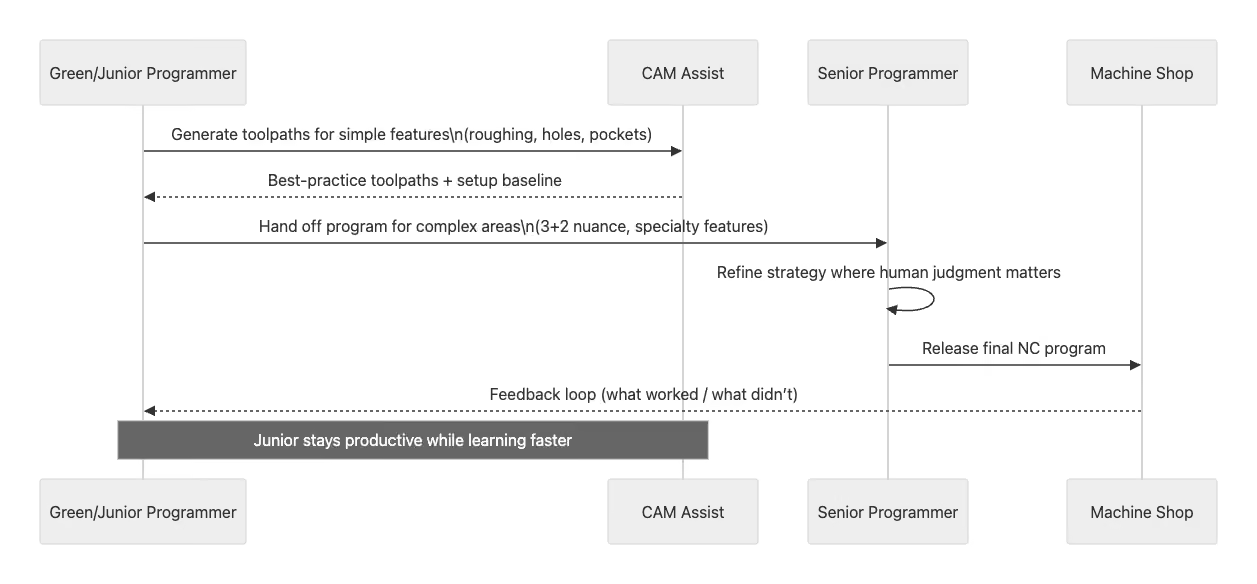
A less-experienced programmer can:
- Run CAM Assist
- Generate safe, sensible toolpaths
- See industry best practices in action
- Hand the result to a senior programmer for refinement
They stay productive while learning - and learning faster.
FBM, by contrast, often requires deep system knowledge before you see value - which means you may require an expert-level programmer to spend a month of their time on it to get the results you want.
So, is CAM Assist the same as Feature-Based Machining?
No.
Feature-based machining is:
- Rule-driven
- Static
- Best suited to highly repetitive work
- Not portable between machines and factories
CAM Assist is:
- Adaptive
- Intuitive
- Immediately useful on new components
- Designed for high-mix, modern manufacturing
- Continually getting smarter so it can support, for example, more complex parts
FBM absolutely has its place. It will continue to be valuable in specific, controlled environments.
But for most shops - especially those dealing with varied parts, frequent changeovers, and limited programming resources - CAM Assist is simply the better tool.
It doesn’t replace expertise.
It amplifies it.
And that’s the difference that matters.